

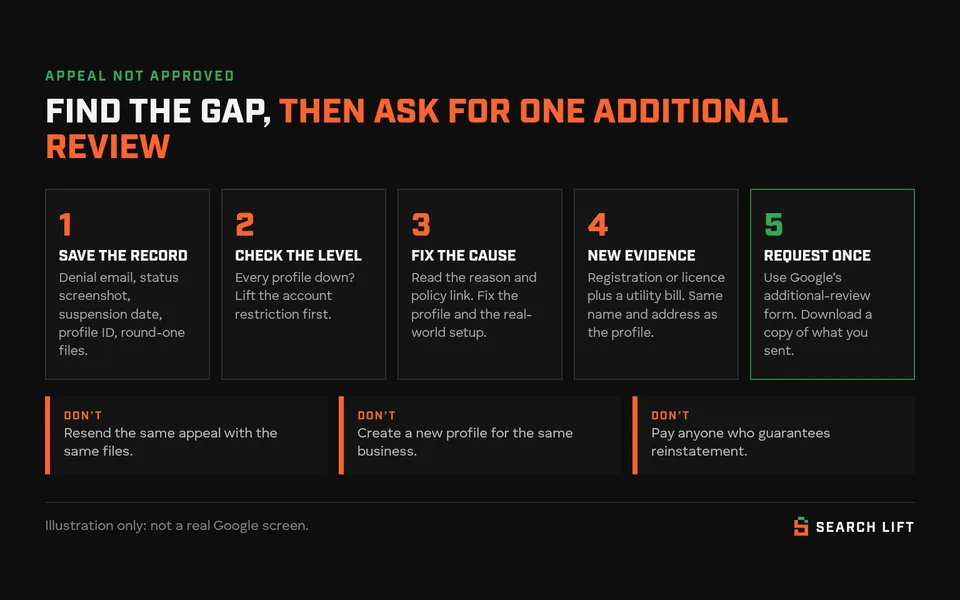
If your Google Business Profile appeal says Not Approved, Google reviewed that appeal and turned it down. It isn’t always the end: Google says that when a reinstatement request is denied, it may be able to do an additional review, and you can add evidence you didn’t send the first time. Don’t resend the same appeal. Find what the reviewer saw, fix it where you can, then file one additional review with documents whose business name and address match the profile.
No one, including us, can promise Google will reinstate a profile. What you can control is whether your second attempt is genuinely stronger than your first.
Last checked against Google Help: 9 Oct 2026. We opened Google’s additional-review form the same day, and this guide describes what it asks for. The rules come from the Google Business Profile Help pages listed under the article. Reports from other practitioners are labelled as reports, not rules.
Which status are you looking at?
Open the Google Business Profile appeals tool, sign in with the account that manages the profile, and select it. The status is shown on the right.
| What you see | What it means | What to do next |
|---|---|---|
| Submitted | Google has your appeal and hasn’t decided yet. Google says decisions can take up to 5 business days. | Wait. Don’t send another appeal for the same issue. |
| Approved | The appeal worked. | Search for your business while signed out to check customers can see it. |
| Not Approved | Google rejected this appeal. It doesn’t say which document or field failed. | Steps 1–6 below, then an additional review |
| Can’t be appealed | The tool isn’t offering an appeal for this profile or decision | If the answer is still no |
| Eligible for appeal | The profile is restricted and you haven’t appealed yet | Fix the profile first, then appeal once (see our guide to a profile suspended after an address change for a full first appeal) |
| Every profile you manage is suspended | Probably an account restriction, not a single profile | Account first, profile second |
| “No moderated content or restricted access to appeal” | The tool has nothing for you to appeal | Google says to contact it if you believe something is still restricted |

What “Not Approved” tells you, and what it doesn’t
For a suspended or disabled profile, the appeals tool shows the restricted profile, the reason for the moderation action and a link to the policy Google says was broken. The denial confirms that a reviewer looked at your appeal and wasn’t convinced. It doesn’t tell you whether the problem was the profile itself, the evidence, or both.
So start with the profile. Paperwork can’t fix a setup that breaks Google’s guidelines. These are the problems Google’s own pages name:
- Name: anything beyond the real-world name, such as service keywords, a city, a tagline or a phone number. Google says unnecessary information in the name can get a profile suspended. Legal terms like “Ltd” or “LLC” are allowed only if your signage, cards or invoices consistently use them.
- Address: a P.O. box or remote mailbox, a virtual office, or a co-working desk without clear signage, customer visits and your own staff during business hours.
- Storefront without signage: businesses that show their address should have permanent signage with their name there.
- Service-area business showing its address: if you don’t serve customers at your address, Google says to remove it.
- More than one profile for the same business or location.
- Ineligible business: Google says a business must make in-person contact with customers during its stated hours. Lead generation companies, online-only businesses, and rental or for-sale properties aren’t eligible.
- “Business does not exist” at that location: Google checks user reports and licensed data, and disables profiles for businesses it decides aren’t where they say they are.
Then look at the evidence you sent. Common gaps: the documents were in the owner’s personal name, showed an old trading name or old address, or the name on the documents doesn’t match the name on the profile.
First, check whether it’s your account or just the profile
Google handles restrictions in a fixed order. An appeal at the wrong level is wasted.
| Level | Signs | Where to appeal |
|---|---|---|
| 1. Your Google Account itself | The account is disabled, suspended or deleted | Fix the Google Account before anything else. Google says you can’t access Business Profile until you do. |
| 2. Account restricted from Business Profile | Every profile the account manages is suspended, and you can’t create or claim new ones | The My accounts page in Business Profile. Give a reason and submit the account appeal. You track its status there too. |
| 3. Another Google product account | The profile was created from an account used for another Google product, and that account was restricted | Google says that account must be reinstated before the profile can be |
| 4. The profile | One profile is suspended or disabled. Your other profiles are fine. | The appeals tool, then the additional-review form if it’s denied |
| 5. Content on the profile | A rejected edit, photo or post | Only after the account and profile are reinstated. Google says a restricted account or profile must be reinstated before you can appeal content decisions. |
If the account restriction was the real problem, a profile appeal was always going to fail. Lift the account restriction first. Google says that once it’s lifted, you can appeal the profile.
After Not Approved: the additional review, step by step
Step 1: Save the record before you change anything
Google’s additional-review form asks for the date the profile was suspended or disabled, the official email address you use to manage the profile, and your Business Profile ID. Collect them now:
- The denial email and a screenshot of the status and reason in the appeals tool.
- The Business Profile ID. Google says you’ll find it under More → Business Profile settings → Advanced settings, if you can still open the profile.
- A copy of every file and every word you sent in the first appeal. Google asks for evidence that wasn’t included the first time, so you need to know what was.
Step 2: Re-read the reason, then check the profile against the guidelines
Open the policy link next to the reason. Then go through the profile field by field: the name exactly as it appears on your signage, website and stationery; an eligible address; the address shown only if customers come to you; service areas by city or postal code (up to 20, within about 2 hours’ drive of your base); categories that say what the business is; hours when customers can actually reach you; and one profile per business.
Step 3: Fix what you can, on the profile and in the real world
If you can still edit the profile, correct what breaks the guidelines. Google’s policy overview also says it may reject content on a suspended profile until it’s reinstated. If your edits keep getting rejected, stop re-saving them. Fix things in the real world instead: put up permanent signage, update your website’s contact page, update the address on your registration. Then describe the fix in the additional-review context box.
Don’t change the name, category and address all at once on a guess. Each change is one more thing a reviewer has to match against your documents.
Step 4: Build a new evidence pack
Google’s additional-review form asks for two kinds of document:
- A business registration or licence showing the business name and address that match the profile you’re appealing. The form accepts official business registration, a business licence or tax certificates.
- A utility bill showing the same business name and address as that registration, licence or tax certificate. The form lists electricity, phone, gas, water, sewage, trash, recycling, TV and internet.
Google also asks you to avoid sending sensitive business documents. Send what proves the name and address, and nothing beyond that. We suggest covering details like account numbers that aren’t needed to show the name and address.
“New” evidence doesn’t mean a bigger pile. It means fixing whatever didn’t match last time. Maybe that’s a licence updated to the current trading name, or a utility bill moved into the business name, or a registration showing the address customers actually visit. The evidence table below shows what that looks like for each type of business.
Step 5: Write a short, factual context note
The form has a box for why you believe the profile should be reinstated and what you’ve done on the listing. Keep it to a few sentences: what the business is, how customers deal with it, what was wrong, what you changed, and which document proves it. A hypothetical example:
“Example Plumbing is a service-area business run from the owner’s home. Customers are never served at that address. After the first appeal was denied, we hid the address, replaced a radius with 12 towns we serve, and removed ‘Emergency 24/7’ from the business name to match our van signage and invoices. Attached: our council trading licence and a broadband bill, both in the business name at the address on the profile.”
Leave out how much the suspension is costing you. The reviewer is deciding whether the business is eligible and accurately represented.
Step 6: Submit the additional-review form once, and keep a copy
Google’s Request additional review of a denied appeal form first asks whether you appealed through the appeals tool and whether that appeal was denied. If not, it sends you back to the tool, because you can’t request an additional review until the original appeal has been denied.
- After you submit, the form says you won’t receive an email confirmation, and that Google’s team will contact you once it has reviewed your appeal. Use Download submission to keep a copy.
- Google doesn’t publish a timeframe for additional reviews. For appeals, it says decisions can take up to 5 business days.
- Don’t send several requests for the same issue, and don’t create a new profile for the same business while it’s under review.
- Managing more than 10 suspended locations? The appeals tool asks whether your appeal covers more than 10 profiles. Answer yes, and you can attach one spreadsheet with the evidence and Business Profile ID for each.
About the 60-minute window: Google’s Help pages still say that once you open the appeal’s evidence form, you must submit within 60 minutes or nothing is attached. Search Engine Roundtable reported on 8 July 2026 that the appeals tool now takes uploads inside the appeal itself. Whichever version you see, have every file ready before you start.
While you wait, it’s worth seeing who is getting your customers. Our free Search Gap check shows who has taken your Maps and search spots while your profile is down.
Evidence by business type: storefront, service-area or hybrid
Google’s list of evidence is the same for everyone. The address it has to match depends on how you’re set up. Google’s list is registration, licence, tax certificates and utility bills. Anything else here supports the case but doesn’t replace those.
| Storefront | Service-area business | Hybrid | |
|---|---|---|---|
| How the profile should look | Address shown, permanent signage with the business name, hours when customers are served | Address hidden. Up to 20 service areas by city or postal code, within about 2 hours’ drive | Address shown and service areas set. The location is staffed and can receive customers during the stated hours. |
| Registration, licence or tax certificate | Business name and the storefront address | Business name and the address on the profile, even though customers can’t see it | Business name and the address customers visit |
| Utility bill | In the business name, at the storefront | In the business name, at the base address. A home bill in your personal name doesn’t match a business name. | In the business name, at the location customers visit |
| Can support it (not on Google’s list) | Photos of the exterior sign and entrance, a lease | Branded vehicle, tools, invoices to customers in your service areas | Both: signage photos and proof of jobs done away from the location |
| Fix first | No sign yet, a virtual office, a co-working desk with no signage or staff | A home address on show, a radius instead of named areas, a separate profile for each town | Hours when nobody is there, an address shown with no staff on site |
Two edge cases. Businesses selling age-restricted products, such as alcohol, cannabis or weapons, can’t be listed as service-area businesses without a storefront. And if you recently moved, your documents have to show the new address. Our address-change suspension guide covers that sequence.
UK, EEA, US and Canada: which route applies
Google handles appeals differently for businesses located or operating in the UK or the European Economic Area (EEA). Here is its own table, simplified:
| What you’re appealing | UK or EEA | US, Canada and rest of world |
|---|---|---|
| Suspended or disabled profile | Appeals tool | Appeals tool |
| Rejected edit (name, category, address, phone, website) | Appeals tool | Contact Google |
| Restricted photo, video or post | Appeals tool | Contact Google |
| Other content restrictions | Contact Google | Contact Google |
| Review removal decision | Reviews management tool | Reviews management tool |
If the profile is still live and only an edit was rejected, that’s a different problem. Our guide to a Google Business Profile phone number that isn’t approved covers rejected edits.
- EEA only: if your business is in an EEA member state, Google says you can refer your appeal to an out-of-court dispute settlement body under the EU Digital Services Act. The European Commission publishes the list of certified bodies. Google says you may want to use its internal appeal first, and that it isn’t bound by these bodies’ decisions.
- UK: the UK isn’t in the EEA, and Google’s page offers this route to EEA businesses. Don’t assume a UK business can use it.
- Documents: Google doesn’t publish a list for each country. Use your official record: a state or local business licence in the US; a Companies House record or council licence in the UK; a provincial registration or municipal licence in Canada. One UK catch: if your Companies House registered office is your accountant’s address, it won’t match the address on your profile. Pair a document that does show the trading address with a utility bill at that address.
- Managing from abroad: the rules follow where the business is located, not where you or your agency sit. Search Lift is based in Pakistan and works with businesses in the UK, USA and Canada.
If the answer is still no
Google’s Help pages don’t say how many additional reviews you can request, or what happens after one is denied. Practitioners report that after a second refusal, the tool usually shows “Can’t be appealed”. That’s their report, not a Google rule. What’s left:
- The Google Business Profile Community. Post the case with your Business Profile ID, what you fixed and what you sent in each round. Answers come from experienced users Google calls Product Experts, not from Google staff.
- EEA businesses: the Digital Services Act dispute route above. Google’s page also notes you can pursue claims in court, and suggests getting your own legal advice for that.
- An honest look at eligibility. If the business runs from a virtual office, generates leads for others or has no in-person contact with customers, no paperwork will change the outcome. The fix is how the business operates, not the appeal.
What doesn’t help: a new profile for the same business. Google tells you not to create one while an appeal is under review. A duplicate doesn’t show on Search or Maps, and it adds a second problem to the first.
What not to do
- Don’t resubmit the same appeal with the same files.
- Don’t send several appeals or additional-review requests for the same issue.
- Don’t create a new Business Profile for the same business.
- Don’t change the name, category and address all at once because you’re guessing.
- Don’t send documents in a different name, such as your personal name or an old trading name, without explaining why.
- Don’t pay anyone who guarantees reinstatement, and never share your account password or a verification code.
When to get help
A second opinion is worth it when you can’t see what the reviewer saw. The same goes if your documents don’t match the profile and you’re not sure which one to change, if your account is restricted, or if you manage several locations. Our Google Business Profile suspension and appeal help covers checking the profile against Google’s guidelines, preparing evidence that matches, and handling the appeal and additional review. Google makes the decision, and our terms say we can’t guarantee it.
Once you’re back, the next question is whether you’re winning back the searches you lost. Run the free Search Gap check: tell us about your business and we’ll look at where you’re missing on Google, Maps and AI answers, which competitors fill those slots, and what to fix first. We typically reply within 1–2 business days.
Related reading: why your Google Business Profile is only visible to you (useful once you’re reinstated, because the owner view can mislead you), and why your business isn’t showing on Google Maps.