

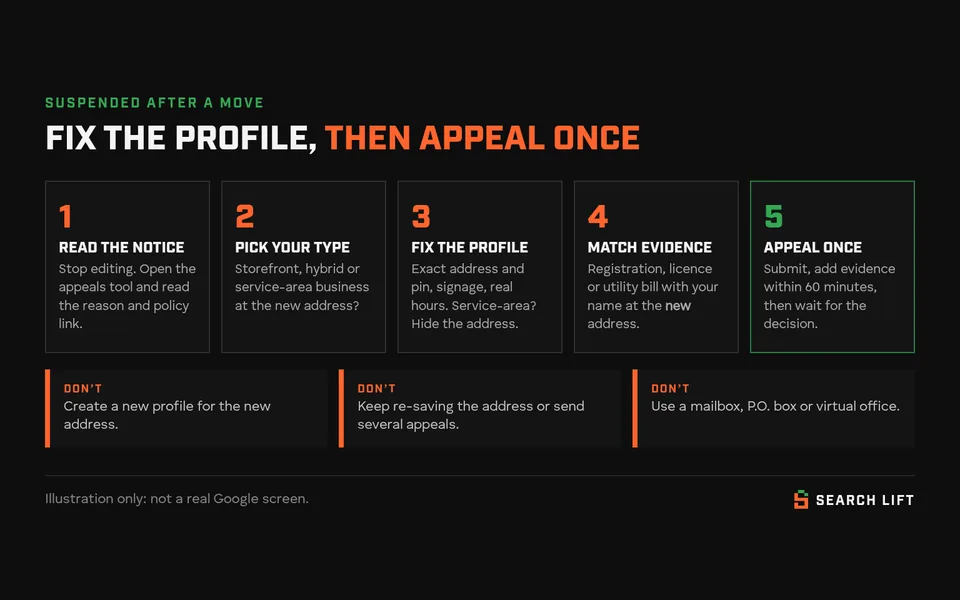
You moved, or just corrected your address, and a few days later your Google Business Profile shows Suspended or Disabled. Customers can’t find you, and the calls stop.
The short answer: when a verified business moves, Google asks it to verify again and checks whether the profile still follows its guidelines at the new address. A suspension usually means something there doesn’t pass. It might look like a mailbox or virtual office, there might be no signage, or the address is shown when it shouldn’t be. Or your documents don’t match. Fix the profile so it describes how you really work at the new location. Then send one appeal with evidence that shows your business name at the new address. Don’t create a new profile. No one, including us, can promise Google will reinstate it.
Last checked against Google Help: 6 Oct 2026. The rules below come from Google’s Business Profile Help pages, listed under the article. Community reports and our own examples are labelled.
Which situation are you in?
| What you see after the move | What it most likely means | Go to |
|---|---|---|
| The address edit says Pending | Still under review. It usually takes minutes, but can take up to 30 days. It isn’t a suspension. | Step 1 |
| The edit says Not approved, but the profile is still live | Google couldn’t confirm the new address. It’s a rejected edit, not a suspension. | US, UK and Canada notes |
| A Get verified button shows up again | Google wants you to verify at the new address | Step 5 |
| The profile is suspended or disabled | Google thinks the profile breaks a guideline, or that the business doesn’t exist where you say it does | Steps 1–7 |
| Every profile you manage is suspended at once | Your Google Account is restricted, not just this profile | Step 2 |
| You visit customers and don’t receive them at your address | You’re a service-area business, and the address probably shouldn’t be shown | Service-area businesses |
| You run a restaurant, hotel or entertainment venue that moved | Google handles this differently. You close the old profile and create a new one. | The one exception |
| You made a second profile for the new address | That’s a duplicate, and it can make the suspension harder to fix | Don’t create a new profile |

Why changing your address can get a profile suspended
To Google, an address change isn’t a small edit. These rules from its Help pages matter most after a move:
- Moving means verifying again. If you move a verified business to a new address, Google says you must verify it again. Edits are also reviewed against the guidelines before they go live.
- The business has to exist where you say it is. Google checks this against user reports and licensed data, and disables profiles for businesses it decides don’t exist at the location claimed.
- Some addresses aren’t allowed. You can’t use a P.O. box or remote mailbox, and Google says profiles that use a P.O. box are suspended. Virtual offices aren’t eligible. A co-working desk counts only if it has clear signage, receives customers and is staffed by your own team during business hours.
- Storefronts need signage. A business that shows its address should have permanent signage with its name there. Google says a business without it isn’t eligible as a storefront and should be listed as a service-area business.
So the move itself is rarely the problem. It made Google look again, and something at the new address didn’t pass. Common examples: no signage up yet, a home address left visible, a shared or virtual office, a wrong pin, or a name and category changed at the same time as the address, which makes it look like a different business.
Google treats “suspended” and “disabled” the same way here. Both go through the same appeals tool.
The fix, step by step
Google’s rules for this are spread across at least five Help pages. Here they are in the order you’ll need them.
Step 1: Stop editing and read the notice
Don’t change anything else yet. Each edit to your name, address or category is reviewed again, and while you’re waiting on a postcard, editing those fields stops the code working. Take a screenshot of the suspension email and note the dates of the move and the edit.
Then open the Google Business Profile appeals tool and select the profile. Google says it shows the reason for the action and a link to the policy you’re said to have broken. Read that before you submit anything, because it tells you what to fix.
Step 2: Check whether it’s your account or just the profile
If every profile you manage was suspended at once, your Google Account may be restricted. Google says that suspends all the profiles the account manages. Appeal the account restriction first, from your “My accounts” page, and the profile only after that.
Step 3: Decide what kind of business you are at the new address
- Storefront: customers come to you during your hours, and there’s permanent signage. Show the address.
- Hybrid: customers come to you and you visit or deliver. Show the address and set service areas. The location must be staffed during your stated hours.
- Service-area business: you go to customers and don’t receive them at your address. Hide the address (see below).
If the honest answer is “a mailbox or a desk with no sign”, that address can’t be a public storefront, and an appeal won’t change it. Change how the business is listed first.
Step 4: Make the profile match how you really work
- Address: use the full official street address. Put a suite or unit number in Address line 2, as Google’s guidelines describe. Don’t add landmarks or keywords.
- Pin: if Google can’t find the address, you can set the pin yourself. Put it on your actual entrance.
- Signage: if you show your address, put up permanent signage with your business name before you appeal.
- Name, category and hours: leave them alone unless they really changed. Hours should be when staff are actually there.
- Website: put the new address on your contact page and footer, so customers and Google see the same thing everywhere.
Step 5: Re-verify if Google asks
If Get verified appears again, use whichever method Google offers you. Google chooses the methods, and you can’t change them. Verification reviews can take up to 5 business days. For a live video call, Google says to be ready to show outside signs or a street sign, your equipment or stock, and proof you manage the business, such as keys or staff-only areas. If you’re sent a postcard, don’t request a new code while you wait. Most arrive within 14 days and expire after 30.
Step 6: Gather evidence for the new address, then appeal once
Google lists evidence that can help: official business registration, a business licence, tax certificates and utility bills (for example electricity, phone, water or internet). Its key tip for anyone who has moved: the business name and address on each document should match the profile. That means the new address. A licence that still shows your old address doesn’t prove you’re at the new one.
- If you can, update your registration or licence and get a utility bill in the business name at the new address before you appeal.
- Have the files ready. Once you open the evidence form after submitting, you have 60 minutes to send it, or nothing is attached.
- Use the context box to explain the move in two or three sentences: when you moved, from where to where, and what kind of business you are now.
- Signage photos or a lease aren’t on Google’s list. They can support your case, but they don’t replace the documents Google names.
Then submit one appeal. Google says decisions can take up to 5 business days and that you shouldn’t send multiple appeals for the same issue. The tool shows the status: Submitted, Approved, Not Approved, Can’t be appealed or Eligible for appeal.
While you wait, it’s worth seeing who is getting your customers. Our free Search Gap check shows who has taken your Maps and search spots while your profile is down.
Step 7: If the appeal is denied, ask for an additional review
If your reinstatement request is denied, Google says it may be able to do an additional review. You can add evidence you didn’t send the first time, such as the updated registration that arrived later. Sending the same files again won’t help. Once you’re reinstated, search for your business while signed out to check it’s public. Our guide to a profile that’s only visible to you explains why the owner view can mislead you.
Service-area businesses: the move that catches people out
Trades that go to the customer, such as plumbers, cleaners and mobile mechanics, get caught here most. Google’s rules:
- If you don’t serve customers at your address, remove it. Google’s own example is a plumber who runs the business from home.
- To hide it: Edit profile → Location → next to “Business location”, select Edit → turn off Show business address to customers → Save.
- Set up to 20 service areas by city, postal code or other area. Google doesn’t allow a radius, and says the whole area shouldn’t be more than about 2 hours’ drive from your base.
- You get one profile for the whole area, unless you have separate locations, each with its own staff and service area.
A hypothetical example: a cleaning company moves from a small unit to the owner’s new home and leaves “show address” on. The profile now presents a house with no signage and no customer visits as a storefront. The fix is to hide the address, keep the service areas, and appeal with documents in the business name at the new address. A sign on the house isn’t the answer.
A real case shows how this can go wrong. In a Google Business Profile Community thread, someone managing a service-area business for a client said its 8-year-old profile was disabled right after they changed both the address and the name to match a new legal registration. The appeal was rejected, and a second profile the client created during the move was suspended too. It’s one person’s account, not something Google has confirmed, but it shows three risks from this guide at once.
Don’t create a new profile (and the one exception)
Google says this in three different Help pages:
- If your business relocates, don’t create a new profile. Update the existing one with the new address.
- Don’t create a new profile because your location changed. If you keep the same name, Google says your reviews move to the new address automatically.
- Never create a new profile for the same business while an appeal is under review.
A second profile is a duplicate, and Google says duplicates don’t show on Search or Maps.
The exception: Google rejects location edits for businesses whose location is part of what customers come for, such as restaurants, hotels and entertainment venues. If one of those moves, Google says to mark the old profile permanently closed and create a new one at the new location. Reviews may not move automatically for some categories, such as hotels.
Didn’t move, just fixing a wrong address? Google’s policy overview says to contact Google.
Already made a second profile? Contact Google before you delete anything. Google says it can move reviews to a new profile you created by mistake after a move, and deleting a profile removes its content and managers.
What not to do
- Don’t appeal before you’ve fixed the profile. You’d be asking Google to approve the problem it already rejected.
- Don’t keep re-saving the address, or send several appeals at once.
- Don’t use a virtual office, mail-forwarding address or P.O. box as your public address.
- Don’t add keywords to your business name while you’re fixing the address.
- Don’t pay anyone who promises guaranteed reinstatement, and never share your verification code. Google says it will never ask for it.
US, UK and Canada notes
- Suspended profiles: in all three countries, you appeal through the appeals tool.
- Rejected address edits, with the profile still live: in the UK and EEA, use the appeals tool. In the US and Canada, use Google’s contact form, and reply to Google’s email if the first answer doesn’t fix it.
- EEA: businesses may also be able to take an appeal to an out-of-court dispute body under the Digital Services Act. Google’s page names the EEA for this, not the UK.
- Documents: Google doesn’t publish a list for each country. Use your official record, such as a state or local business licence in the US, a Companies House record or council licence in the UK, or a provincial registration or municipal licence in Canada, updated with the new address.
- Managing from abroad: the rules follow where the business is located, not where you or your agency sit. Search Lift is based in Pakistan and works with businesses in the UK, USA and Canada.
Moving soon? Do this first
- Decide whether you’ll be a storefront, hybrid or service-area business at the new place. If you’ll be a storefront, put up permanent signage before you edit.
- Update your registration or licence address, and set up a utility account in the business name at the new address.
- Change only the address and pin, in one edit. If the name or category also changes, do that separately.
- Expect to verify again, and update your website’s contact page the same day.
When to get help
Most owners can work through this on their own. It’s worth getting a second opinion if the appeal comes back Not Approved, the appeals tool doesn’t make clear what to change, your account is restricted, or a duplicate already exists. Our suspension and reinstatement help covers checking the profile against Google’s guidelines, preparing the evidence and handling the appeal. We can’t guarantee Google’s decision, and our terms say so.
Once you’re back, the next question is whether you’re winning back the searches you lost. Run the free Search Gap check: tell us about your business and we’ll look at where you’re missing on Google, Maps and AI answers, which competitors fill those slots, and what to fix first. We typically reply within 1–2 business days.
Related reading: why your business isn’t showing on Google Maps, and what to do when your Google Business Profile phone number isn’t approved. A phone number change is often the next edit after a move.