

You changed the phone number on your Google Business Profile. Now it sits on Pending, flips to Not approved, or never appears for customers. Calls stop. Bookings stall.
The short version: Google reviews phone edits like other profile edits. A number that fails its guidelines, doesn’t match what Google can confirm, or is hidden by a setting will not stay live. This guide covers each status, why rejections happen, how to use the evidence route Product Experts describe on Google’s own community, and how to appeal without making things worse.
Last checked against Google Business Profile Help: 5 October 2026.
Which situation are you in?
| What you see | Likely meaning | Go to |
|---|---|---|
| Phone edit shows Pending | Still under review (minutes to 30 days) | Pending edits |
| Phone edit shows Not approved | Google couldn’t confirm accuracy, or the number breaks the guidelines | Why numbers get rejected · Fix path · Appeal |
| Number looks fine to you, but customers don’t see it | “Don’t show” is on, a Google update reverted you, or you’re checking while signed in | Phone not showing |
| You’re trying to use a tracking / VoIP / call-centre number | High risk under Google’s phone rules | Call tracking done safely |

What “Pending”, “Not approved” and “not showing” mean
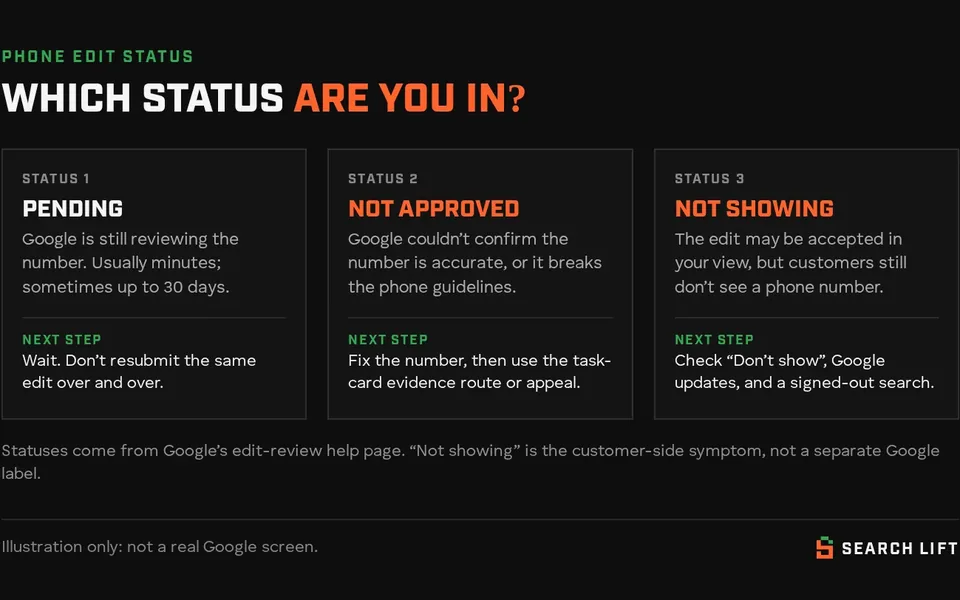
Google’s help page on Business Profile edits says changes to a verified profile are reviewed against its guidelines. After you save, an edit can show as:
- Accepted — the updated info displays on your Business Profile.
- Not approved — Google might not approve the change if it can’t confirm its accuracy. You might be able to appeal rejected business information edits.
- Pending — still under review. Google says this usually takes up to 10 minutes, but sometimes up to 30 days.
“Phone number not showing” is usually a customer-side symptom, not a third official label. The number may be accepted in the owner view, hidden by a setting, overwritten by a Google update, or still pending while you keep refreshing signed in.
You can add a primary number plus up to two more (mobile or landline; not fax). Google also lets you hide the phone number entirely under Advanced settings → Phone number → Don’t show. If customers can’t see a number, check that first.
Why Google rejects or stalls a phone number
Google’s guidelines for representing your business are explicit about website and phone:
- Provide a phone number that connects to your individual business location.
- Use a local phone number instead of a central call-centre helpline whenever possible.
- Do not provide phone numbers that redirect or “refer” callers to landing pages or phone numbers other than those of the actual business.
- The phone number must be under the direct control of the business.
- Premium phone numbers are not acceptable, regardless of the rate charged to the caller.
- Additional phone numbers can be used on Google Business Profile websites and other local surfaces.
In practice, the rejections we see most often (and that match those rules) look like this:
- The number is tied to another profile or business. Google is trying to keep one clear contact path per location. If the same line sits on a closed location, a sibling brand or an old agency profile, confirmation can fail.
- VoIP, virtual or call-tracking numbers that redirect. If the number doesn’t ring the business under its own control, it sits on the wrong side of the “direct control” and “no redirect” rules.
- The number isn’t on your website (or doesn’t match). Google and users both check consistency. A brand-new mobile that appears nowhere else is harder to confirm.
- Format and region checks. Enter the number with the correct country selected. Google formats punctuation for you. In some regions, Google has added extra phone-accuracy steps (more on the evidence route below).
- Repeated resubmits while an edit is Pending. Stacking the same change doesn’t speed review up and can keep the profile in a noisy state.
None of this is a guarantee that a “clean” number will sail through. Google says it might not approve a change when it can’t confirm accuracy. Be honest with customers about timelines.
How to get a rejected or pending phone number through

- Put the right number on the profile first. Prefer the local line customers already use, printed on your website contact page and under your control. Update the website to match before you fight the edit.
- Submit the phone edit once. Go to your Business Profile → Edit profile → Contact → Phone number. Add up to two additional numbers if you need them. Save, then wait. Pending can take up to 30 days.
- Use the task-card evidence route when it’s offered. On Google’s Business Profile community, Product Expert Joy Hawkins has explained that in some regions Google asks owners to submit additional information to verify phone edits, via a Learn more link on the task card for that edit. Merchants who contact support are pointed back to the same process. Have evidence ready that shows the business controls the number: a phone bill, business registration, licence or tax certificate where the name (and address, if shown) matches the profile. This is community guidance on Google’s own forum, not a separate Help Center article with that exact “Learn more” wording, so treat the path as the recommended support process when you see the link.
- Don’t create a second profile to force a new number live. Google allows one profile per business, and a duplicate won’t show on Search or Maps.
- If the edit is Not approved, appeal with matching evidence (next section). Fix the number against the guidelines before you appeal the same bad number again.
For a worked example (hypothetical): a UK plumber swaps a shared call-centre 0800 for the shop’s local landline, puts that landline in the website footer the same day, submits one edit, and attaches a recent phone bill when the task card offers Learn more. That lines up with Google’s local-number and direct-control rules. Swapping in a third-party tracking number that forwards to three franchises does not.
How to appeal a phone number that wasn’t approved
Google’s appeals help page treats a rejected phone edit as a rejected business information edit (name, category, address, phone, website).
- UK or EEA: use the Google Business Profile appeals tool for rejected profile edits.
- Rest of the world (including the US, Canada and Pakistan-based managers of overseas locations): use Google’s contact form to appeal a rejected phone edit. Profile suspensions still go through the appeals tool.
Before you start:
- Confirm the profile is verified. Unverified profiles may not show content across Google.
- If the Google Account or profile is restricted, reinstate that first. Google says you can’t appeal content decisions while the account or profile is restricted.
- Prepare evidence in advance. Google lists official business registration, a business licence, tax certificates and utility bills (electricity, phone, cable, internet). The name and address on the documents should match the profile.
- After you submit an appeal, you may get a linked evidence form. Google says you must submit that evidence within 60 minutes or it won’t attach.
- Appeal reviews can take up to 5 business days. Do not submit multiple appeals for the same issue before you get a decision.
- Do not create a new Business Profile for the same business while the appeal is under review.
Check status in the appeals tool: Submitted, Approved, Not Approved, Can’t be appealed, or Eligible for appeal. Nobody outside Google can promise reinstatement or approval. That matches how we describe limits on our terms.
Call tracking numbers: how to do it without picking a fight with Google
Many service businesses want call tracking. Google’s written rules still win:
- the number must be under the business’s direct control;
- it should connect to the individual location;
- redirect / refer numbers are not allowed;
- central call-centre helplines are discouraged in favour of a local number;
- premium-rate numbers are banned.
A safer setup that stays closer to those rules:
- Primary number: your real local business line (or the mobile that staff actually answer), printed on your website.
- Additional numbers (up to two): only if they still belong to the business and ring your team. Don’t park a vendor-owned redirect as the only public number.
- Ads vs profile: Google Ads forwarding / call-reporting numbers are for ads. Google’s Ads help says those forwarding numbers are Google’s property, can change, and shouldn’t be promoted outside that call-reporting use. Don’t paste an Ads forwarding number into your Business Profile as if it were your shop line.
- Website tracking: track calls on your site with numbers you control, and keep the GBP primary number stable and consistent with NAP citations.
If a tracking vendor’s number has already been rejected, switch the primary back to the real line, align the website, wait for Pending to clear, then decide whether any additional number is worth another review. We do not publish a “guaranteed tracking setup.” The guidelines above are the constraint.
Phone number not showing (even when the edit looks accepted)
- Advanced setting: More Business Profile settings → Advanced settings → under Phone number, is Don’t show turned on? Turn it off if you want the number public.
- Google updates: Google may change profile info from user reports and other sources. Check Edit profile for alerts about updates and review them.
- Signed-out check: search your business name and city in a private window and on a device that isn’t signed into the owner account. Owner view can mislead you. Our guide to a profile that is only visible to you covers the wider visibility problem.
- Whole profile missing: if the business doesn’t appear at all signed out, fix verification, suspension or duplicates first with the Google Maps diagnosis.
US, UK and Canada notes
- UK and EEA: rejected phone edits can go through the appeals tool. UK/EEA businesses also have DSA-related redress options Google documents on the same appeals page.
- United States and Canada: use the contact-us route for a rejected phone, category, address or website edit. Keep evidence that shows the number is yours (carrier bill, registration).
- Country code: pick the correct country in the phone editor so Google formats the number for that market.
- Managers abroad: Search Lift is based in Pakistan and works with clients in the UK, USA and Canada. Appeal location follows where the business operates, not where the manager sits.
When to get help
Work the steps above first. Get a second pair of eyes when:
- the same local number is Not approved after a clean one-edit submission with evidence;
- support keeps sending you back to a task card you can’t see;
- the profile is also suspended, duplicated or only visible to managers;
- you’re public, but competitors still own the calls for your main searches.
Run the free Search Gap check: tell us about your business and we’ll look at where you’re missing on Google, Maps and AI answers, which competitors fill those slots, and what to fix first. We typically reply within 1–2 business days. Phone, category and suspension work sits inside our Google Business Profile fixes service. If the number is fine but you’re still losing the map pack, pair it with local SEO. Quick wins are part of the $797 Fix Sprint.
Related reading while you wait on a review: why your business isn’t showing on Google Maps, and what a duplicate status on your Google Business Profile means when that guide is published.